
Your whole marketing department, in one AI studio.
Create images, video, podcasts, blogs, newsletters and even print mailers. Publish to every channel. Capture the leads that come back. LeadsCloud AI Studio does it all from one brief.
The weekly update, in two voices
grow here.
This week's brief
Works with the tools you already use
One studio. Every format your audience sees.
Make anything from one brief.
Write a brief, add URLs, research or your own data, then pick the model. The studio turns it into every asset your campaign needs, as tracked jobs you can retry, schedule or hand to an agent.
- Images, carousels and 4K edits
- Video clips, long video and vertical Reels
- Podcasts with natural two-voice audio
- Blogs, social copy, charts and newsletters
- Choose Gemini, OpenAI or Grok per job
Everything you need to show up everywhere.
Publish to eight networks at once
Feed posts, carousels, Reels, Shorts and pins. Auto-publish when a job finishes, with a saved receipt that confirms what went live.
Pick the best model for each job
Switch providers per job without changing your workflow.
Video, Reels & long-form
Generate clips, extend them into long video, or build 15, 30 and 60 second vertical Reels with voiceover.
Newsletters that write themselves
Weekly briefs built from your data, sent through Loops, Mailgun or Resend, and archived to your CMS.
Research first
Evidence-first web research becomes a package every generator can draw on, so content stays accurate.
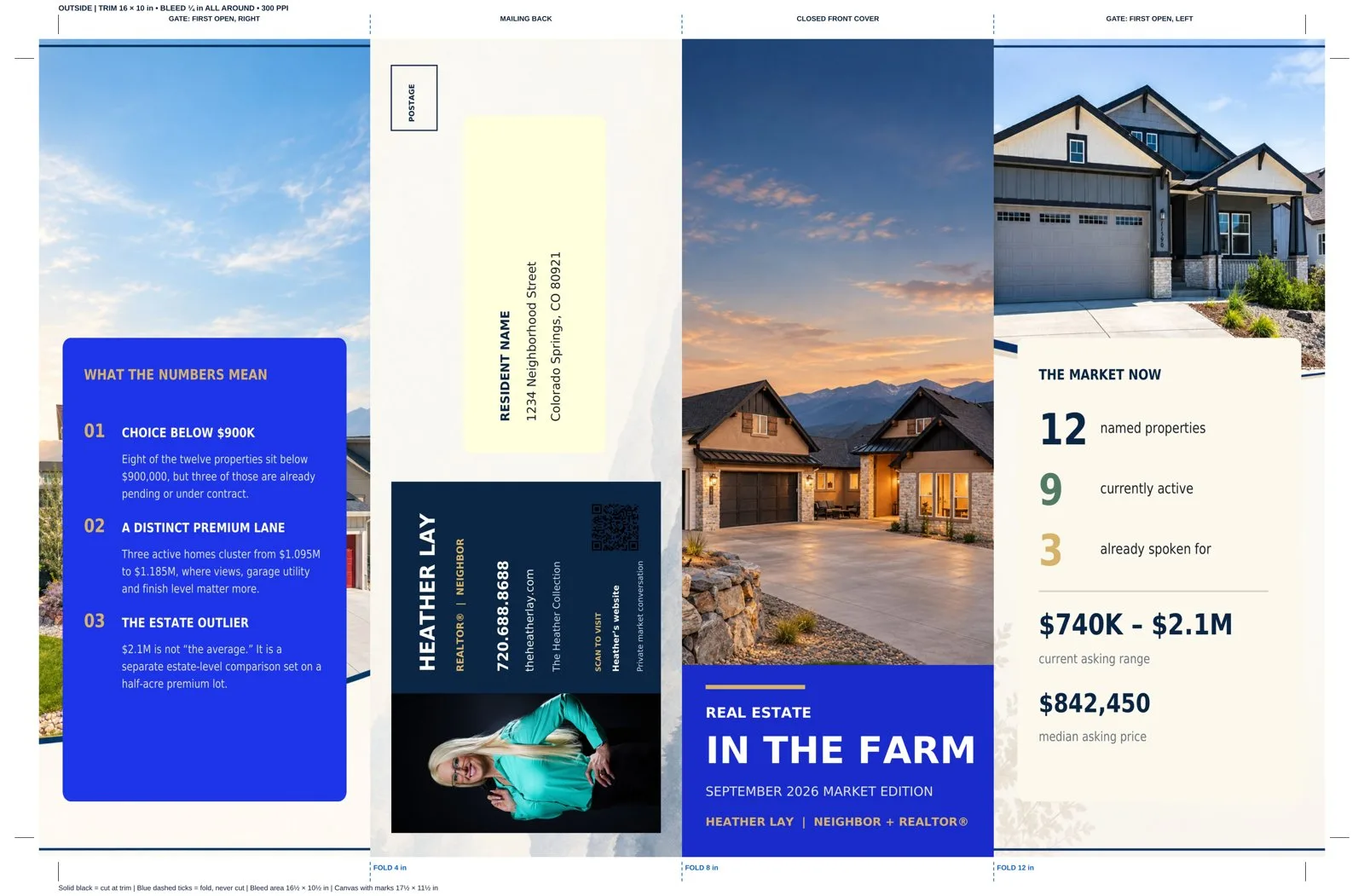
When it needs to be in their hands, print it.
Design folded mailers laid out to your print house's exact specs. AI plans the panels, writes the copy and makes the photos, then preflight checks everything before you export a print-shop ready package.
- Bi-fold, tri-fold, double gate
- Bleed, crop and fold marks
- Live QR codes
- PDF, PNG and ZIP package
Set it up once. It runs every week.
Research
Pull from URLs, data feeds, listings or the web into a research package.
Create
Generate images, video, audio, copy and print panels from one brief.
Compose
Chain jobs into carousels, Reels and multi-format runs.
Publish
Schedule to social, CMS, email and partner apps automatically.
Grow
Capture leads, reply instantly and track rank and reach.
Made for the way you sell.
Real estate teams
Listing media, market mailers, MLS-driven posts and lead alerts.
ExploreFranchises & multi-location
One brand, many projects, local SEO per location.
ExploreFinancial publishers
Market charts, weekly briefs and narrated podcasts.
ExploreAgencies
Run every client as a project with its own channels.
ExploreHand the brief to Claude. Watch the campaign run.
LeadsCloud AI Studio ships a secure MCP server, so AI agents can research, generate, publish, print and manage leads with the same tools your team uses. Access is OAuth-protected and scoped per project.
Illustrative example. Tool names are the real LeadsCloud MCP tools.
Creative power. Considered controls.
Questions, answered.
Still curious? Book a 30-minute walkthrough and we'll show it with your own brand.
Which AI models does the studio use?
Google Gemini, Imagen and Veo 3.1, OpenAI, and xAI Grok Imagine, plus Google text-to-speech. You pick the provider and model per job, and admins control which models are available.
Which social networks can I publish to?
Facebook, Instagram, X, LinkedIn, YouTube, TikTok, Pinterest and Google Business Profile. Posts can go out automatically when a job finishes, and every post gets a saved receipt.
Can the print files really go straight to a printer?
Yes. You enter your print house's requirements (trim, bleed, resolution, marks and folds) as a print profile. The studio lays out every panel to those specs, runs a preflight check, and exports a PDF, per-side PNGs and a ZIP package.
Is LeadsCloud only for real estate?
No. The studio is general purpose. Real estate teams use it heavily, and so do franchises, financial publishers, agencies and local businesses.
How do AI agents like Claude connect?
Through the LeadsCloud MCP server. An admin approves the connection with OAuth, and the agent can then use the same 206 tools your team uses, limited to the projects it was granted.
Is my generated content labeled?
The studio inspects Content Credentials (C2PA) on generated images, audio and video, so you know what each file carries before it is published.
How do I get access?
LeadsCloud AI Studio is set up with each team. Book a demo and we will walk you through it with your own brand, channels and goals.
Make next month's marketing this afternoon.
See the studio with your own brand, channels and goals.